
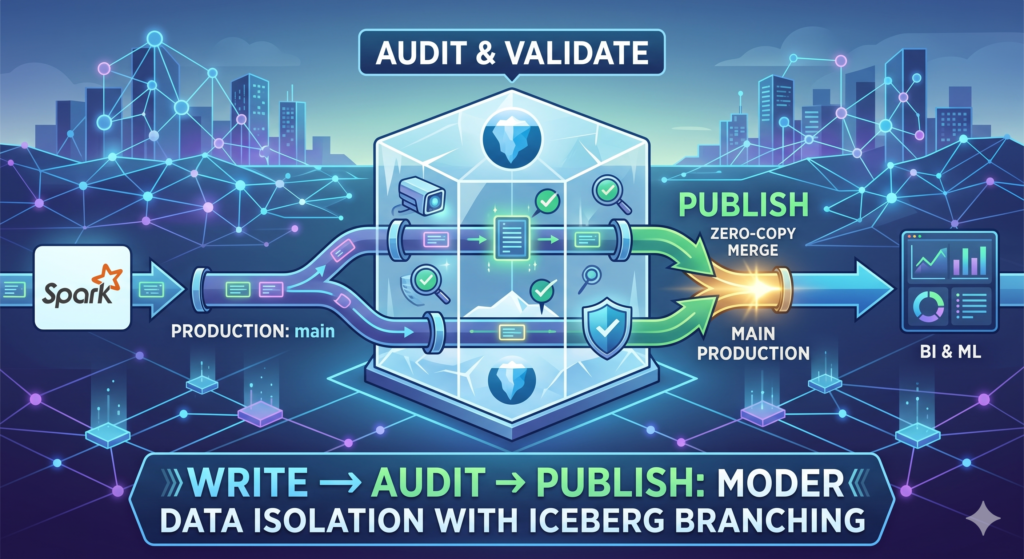
TL;DR:
The Problem: Bad data hitting production tables breaks downstream dashboards and ML models.
The Solution: The Write-Audit-Publish (WAP) pattern acts as CI/CD for data, isolating new data until it passes quality checks.
The Tech Stack: Apache Iceberg’s native branching combined with PySpark allows for “zero-copy” WAP. Data is written to an isolated branch, audited, and then atomically published to the
mainbranch via a metadata pointer update without moving any physical files.
“Hey, the revenue dashboard looks completely wrong today. Did something change?”
If you have spent any time managing production data pipelines, that Slack message is likely burned into your retinas.
In the traditional data lake world, we often operate on a “deploy and pray” model. A Spark job runs, overwrites a partition or appends new records, and immediately exposes that data to downstream consumers. If upstream changes introduce nulls, duplicate keys, or malformed schema elements, the damage is instantly propagated to business users.
Software engineers solved this problem decades ago with CI/CD: branching, automated testing, and merging only upon success. As data engineers, we need that exact same rigor for our data lakehouses. We need the Write-Audit-Publish (WAP) pattern.
What is the Write-Audit-Publish (WAP) Pattern?
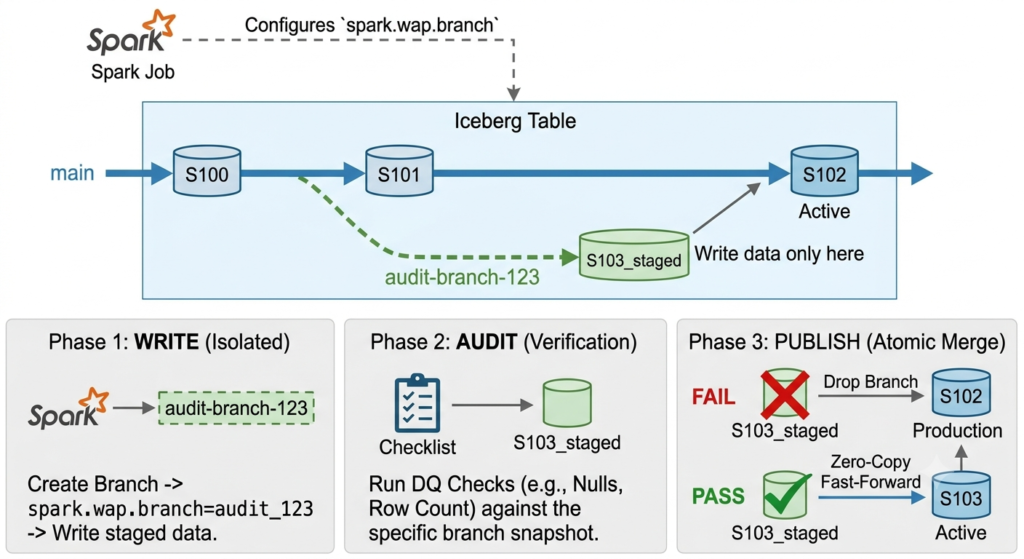
The WAP pattern is a data engineering framework designed to prevent bad data from reaching production. It consists of three distinct phases:
Write: Stage your new data in a hidden, isolated environment.
Audit: Run automated data quality checks (e.g., null checks, row counts, referential integrity) against this isolated data.
Publish: If the audit passes, atomically expose the new data to downstream consumers. If it fails, halt the pipeline. Production remains completely untouched.
The “Old Way” vs. The Apache Iceberg Way
Implementing WAP on legacy Hive-style data lakes used to require complex workarounds: writing to temporary S3 directories, physically moving gigabytes of Parquet files upon success, or maintaining fragile logic to swap out SQL views.
Enter Apache Iceberg.
Because Iceberg abstracts physical files behind a powerful metadata tree, it allows us to treat our data lake like a Git repository. With the introduction of native Branching and Tagging (Iceberg 1.2+), implementing WAP no longer requires copying massive folders.
We can configure PySpark to write directly to an isolated branch, run our audits, and publish to production using a zero-copy metadata pointer update (a fast-forward merge).
Step-by-Step Tutorial: WAP in PySpark and Iceberg
Let’s look at how to orchestrate a true zero-copy pipeline. Assume we have an Iceberg table called prod.finance.transactions. We want to ingest today’s data, but only if the transaction_amount is never null.
Step 1: The Write Phase (Isolated Staging)
First, we create an audit branch. Then, we configure our Spark session to write exclusively to this branch. Downstream consumers querying the main table will not see this data yet.
# 1. Create a new branch off the main table state
spark.sql("""
    ALTER TABLE prod.finance.transactions
    CREATE BRANCH audit_etl_run_123
""")

# 2. Configure Spark to route writes to this specific branch
spark.conf.set("spark.sql.iceberg.branch.name", "audit_etl_run_123")

# 3. Write the new data.
# This appends to the audit branch, leaving the main branch untouched.
new_data_df.write \
    .format("iceberg") \
    .mode("append") \
    .save("prod.finance.transactions")
Step 2: The Audit Phase (Data Quality Checks)
Now the data is safely staged. We can query the branch directly using Spark SQL to ensure our invariants hold true.
# Spark is still configured to read from "audit_etl_run_123"
# Let's run a data quality check: are there any null amounts?

null_count = spark.sql("""
    SELECT count(*)
    FROM prod.finance.transactions
    WHERE transaction_amount IS NULL
""").collect()[0][0]

if null_count > 0:
    # THE AUDIT FAILED
    # Drop the branch to clean up metadata. Production was never impacted.
    spark.sql("ALTER TABLE prod.finance.transactions DROP BRANCH audit_etl_run_123")
    raise ValueError(f"Audit failed! Found {null_count} null transactions. Data safely discarded.")
else:
    print("Audit passed. Proceeding to publish.")
Step 3: The Publish Phase (Zero-Copy Merge)
If the audit passes, we expose the data. We don’t move any underlying Parquet files. We simply use an Iceberg system procedure to fast-forward the main branch pointer.
# 1. Publish the data atomically to production
spark.sql("""
    CALL prod.system.fast_forward(
        'finance.transactions',
        'main',
        'audit_etl_run_123'
    )
""")

# 2. Clean up the audit branch
spark.sql("ALTER TABLE prod.finance.transactions DROP BRANCH audit_etl_run_123")

# 3. Unset the Spark branch configuration for future jobs
spark.conf.unset("spark.sql.iceberg.branch.name")
Orchestrating WAP with Apache Airflow
To fully operationalize this, map these phases to an orchestrator like Airflow. A standard DAG structure involves:
create_branch_taskwrite_data_taskaudit_data_task(using tools like Soda or Great Expectations)publish_taskcleanup_task
By combining Apache Iceberg’s metadata-driven branching with Spark, the Write-Audit-Publish pattern is no longer a complex architectural burden—it is a native, fast, and elegant process.
Frequently Asked Questions (FAQ)
Does branching in Apache Iceberg duplicate data?
No. Branching in Iceberg is a metadata-only operation. It creates a new pointer to a snapshot tree. The underlying Parquet files are only written once during the “Write” phase.
Can downstream BI tools query the audit branch?
Yes. If you need to debug or allow analysts to verify data before publishing, they can query the branch directly using Iceberg’s time-travel and branch syntax: SELECT * FROM table VERSION AS OF 'audit_branch_name'.
What happens to concurrent reads when the Publish phase happens?
Because Iceberg uses snapshot isolation, concurrent reads are completely safe. If a query starts before the fast_forward publish, it will continue reading the older snapshot. Queries starting after the publish will read the new snapshot. There is no downtime or table locking.
