

Apache Airflow is a known standard for workflow scheduling across the data engineering industry. Integrating Apache Airflow with the AWS ecosystem has become easier than ever with MWAA. To make MWAA work efficiently, I prepared a comprehensive guide using CDK to spin up MWAA and some tips for MWAA specifically to help you understand the deployment for Airflow in AWS.
Why infrastructure in code (CDK)?
AWS offers a user-friendly graphical interface, making deploying the services we need simple. Do we still need to write infrastructure code for those services?
Using infrastructure in code might be unnecessary for a quick and easy way to understand AWS services.
For production and scalability needs, using an infrastructure-as-code approach would be beneficial in the long term: it makes your interaction with AWS sharable, reusable, scalable, and effective.
CDK has gained popularity in AWS due to its support for multiple languages, such as TypeScript, JavaScript, Python, Java, C#/.Net, and Go, allowing you to enhance your logic with your favorite languages.
How does MWAA work?
MWAA stands for Managed Workflows for Apache Airflow. Similar to other Amazon-offered managed services, Apache Airflow can be up and running in less than 30 minutes with all the necessary integrations, including VPC, IAM role, S3, KMS, and CloudWatch.
If you have experience working with Apache Airflow locally or setting it up in Docker, you may know that the DAG folder must be in both the scheduler and worker containers.
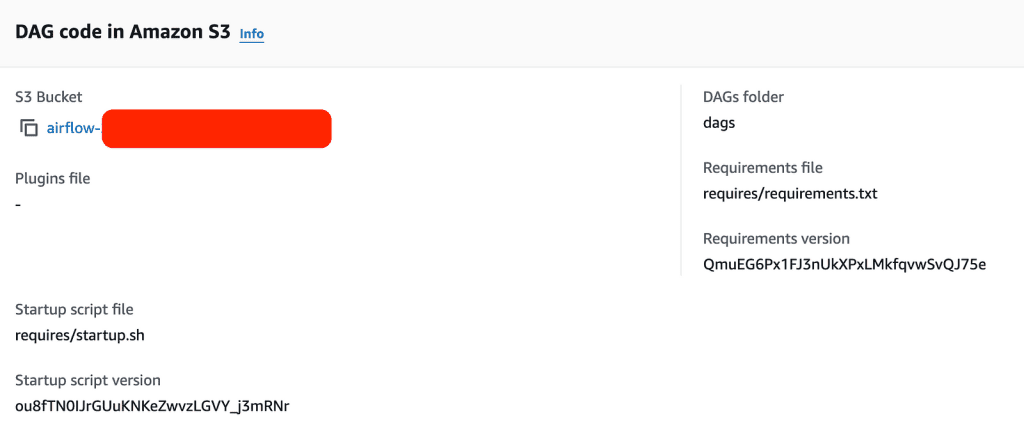
Since direct SSH access to MWAA is unavailable, AWS offers an alternative method for updating files in the DAG folder by syncing a specified S3 path every 30 seconds. When MWAA is initiated, you must provide a specific s3 path to sync into Airflow. To add or update DAGs, upload the new file to the designated folder.
Optionally, before you start an MWAA cluster, you can also choose to install a package or plugins into the Airflow instance, or you can run a start.sh file to customize further your airflow setup.
Now, let’s use CDK to spin up MWAA.
Start MWAA with CDK
You can follow the Tutorial: Create your first AWS CDK app to try CDK before starting MWAA.
Add S3 bucket
We will first create a bucket called “my-airflow-awesome-bucket,” then copy the asset from local to the decided path for dags, requirements, and the Scrapy project.
					dags_bucket = s3.Bucket(
  self,
  "mwaa-dags",
  bucket_name=f"my-airflow-awesome-bucket",
  versioned=True,
  block_public_access=s3.BlockPublicAccess.BLOCK_ALL
)

for tag in s3_tags:
  Tags.of(dags_bucket).add(tag, s3_tags[tag])

dag_deploy = s3deploy.BucketDeployment(self, "DeployDAG",
  sources=[s3deploy.Source.asset("./dags")],
  destination_bucket=dags_bucket,
  destination_key_prefix="dags",
  prune=False,
  retain_on_delete=False
)

requires_deploy = s3deploy.BucketDeployment(self, "DeployRequirement",
  sources=[s3deploy.Source.asset("./requires")],
  destination_bucket=dags_bucket,
  destination_key_prefix="requires",
  prune=False,
  retain_on_delete=False
)

slickdeals_deploy = s3deploy.BucketDeployment(self, "DeploySlickdeals",
  sources=[s3deploy.Source.asset("./scrapy_project")],
  destination_bucket=dags_bucket,
  destination_key_prefix="scrapy",
  prune=False,
  retain_on_delete=False
)
Build MWAA with the configuration.
We will use a mw1.small for demonstration purposes, note that the MWAA cluster isn’t cheap; it costs $0.49 per hour. Unlike other AWS service charges on usage, MWAA runs 24/7. Even if your Airflow scheduler doesn’t schedule any jobs for some time, charges will still be incurred.
					managed_airflow = mwaa.CfnEnvironment(
    scope=self,
    id='airflow-test-environment',
    name=f"airflow-awesome-data",
    airflow_configuration_options={'core.default_timezone': 'utc'},
    airflow_version='2.9.2',
    dag_s3_path="dags",
    environment_class='mw1.small',
    execution_role_arn=mwaa_service_role.role_arn,
    kms_key=key.key_arn,
    logging_configuration=logging_configuration,
    max_workers=3,
    network_configuration=network_configuration,
    requirements_s3_path="requires/requirements.txt",
    source_bucket_arn=dags_bucket_arn,
    webserver_access_mode='PUBLIC_ONLY'
)
How to integrate a Scrapy project into MWAA?
One of the challenges of running a Scrapy project is that we first need to install the Scrapy package and then copy the Scrapy project under the Airflow instance to crawl correctly.
To resolve the installation for Scrapy, we can provide an S3 path as part of the MWAA CDK process — requirements_s3_path.
To resolve Airflow resolve the Scrapy project at runtime, we’d need to copy the Scrapy into the S3 path. One option is to copy the Scrapy project into the MWAA cluster. However, I found that option is limited because I cannot update my Scrapy script; the only way to do so is to tear down the MWAA cluster and then spin it up again.
Another option to resolve the Scrapy project update is to copy the Scrapy project from S3 into the MWAA cluster at each DAG execution.
					move_project_task = BashOperator(
    task_id='move_project',
    bash_command='aws s3 cp s3://YOUR_BUCKECT/YOUR_SCRAPY_PROJECT/  /tmp/ --recursive;',
    dag=dag
)
Now you can run your Scrpay job by simply using the BashOperator
					scrapy_task = BashOperator(
    task_id='crawl_job',
    bash_command='cd /tmp/YOUR_SCRAPY_PROJECT/; scrapy crawl my_scrapy_project',
    dag=dag
)
Final Thought
With MWAA, setting up your Apache Airflow cluster in the AWS cloud has become more manageable. The nature of the Scrapy project would be a great fit with Airflow, allowing for frequent website crawling with a user-friendly Airflow UI, robust failure handling, and reliable scheduling.
I hope you find this post helpful in guiding you through how to build a Scrapy project into MWAA with CDK.
