SQL has traditionally served as the fundamental language for the majority of data analytics tasks. We often come up with questions that need data to get answers. SQL is essential for converting business requirements into executable code for data retrieval. However, with AI, we can develop an AI agent capable of addressing business inquiries without necessitating SQL expertise.
This post will demonstrate the construction of an AI agent from inception using LangChain and DuckDB. After building your own AI agent for SQL, you can accomplish data analytics tasks fairly quickly. Even more intriguingly, we can use a random dataset from Kaggle to test the AI’s ability to analyze data in SQL.
Tools & Data Used Today
- DuckDB: DuckDB is an in-process SQL OLAP database management system; it is easy to install & write analytics SQL queries from a CSV/JSON file in seconds.
- LangChain: LangChain is a composable framework to build with LLMs. Given the rapid growth of AI agents, a key component of developing our agents is using a framework like LangChian to manage the LLM process and carry out specific built-in operations.
- OpenAI API Key: LangChain is just a framework to build applications with LLMs. In order to comprehend the analytics question, parse it using a known schema, and then generate the result, we still require an LLM solution. One of the powerful LLMs from OpenAI is,
gpt-4owhich is the latest model developed in May 2024. We will use this model as the brain in our SQL generation AI agent. - Netflix Dataset: We will use the Netflix Movies and TV Shows dataset from Kaggle as a sample to test our AI agent for SQL generation.
High Level Workflow for SQL Generation AI Agent
At a high level, our AI agent for SQL generation follows three primary steps.
- write_query: All the magic happened here, and knowledge of the input to generate SQL is the most important aspect. We provide an analytic question as input and get a SQL query as an output. For instance, we could put the following question as input: “Give me the store with yearly total revenue exceeding two million.” The output would be an executable SQL query like:
SELECT store, SUM(sale_price) revenue
FROM sales
GROUP BY store
HAVING SUM(sale_price) > 2000000000
2. execute_query: after getting the SQL statement from the write_query step, this step is using the SQL generated from LLM to run against DuckDB to fetch the actual result. It is essentially the same process as running the SQL statement that you wrote yourself. We can leverage LangChain to manage the state of this workflow: The output from write_query will feed as input to execute_query
3. generate_answer: despite the fact that the result from step 2 is obtained in a tabular format, it may still be difficult to interpret. In the generate_answer step, we refine our answer by feeding the tabular result back into LLM, expecting it to produce more human-readable output.
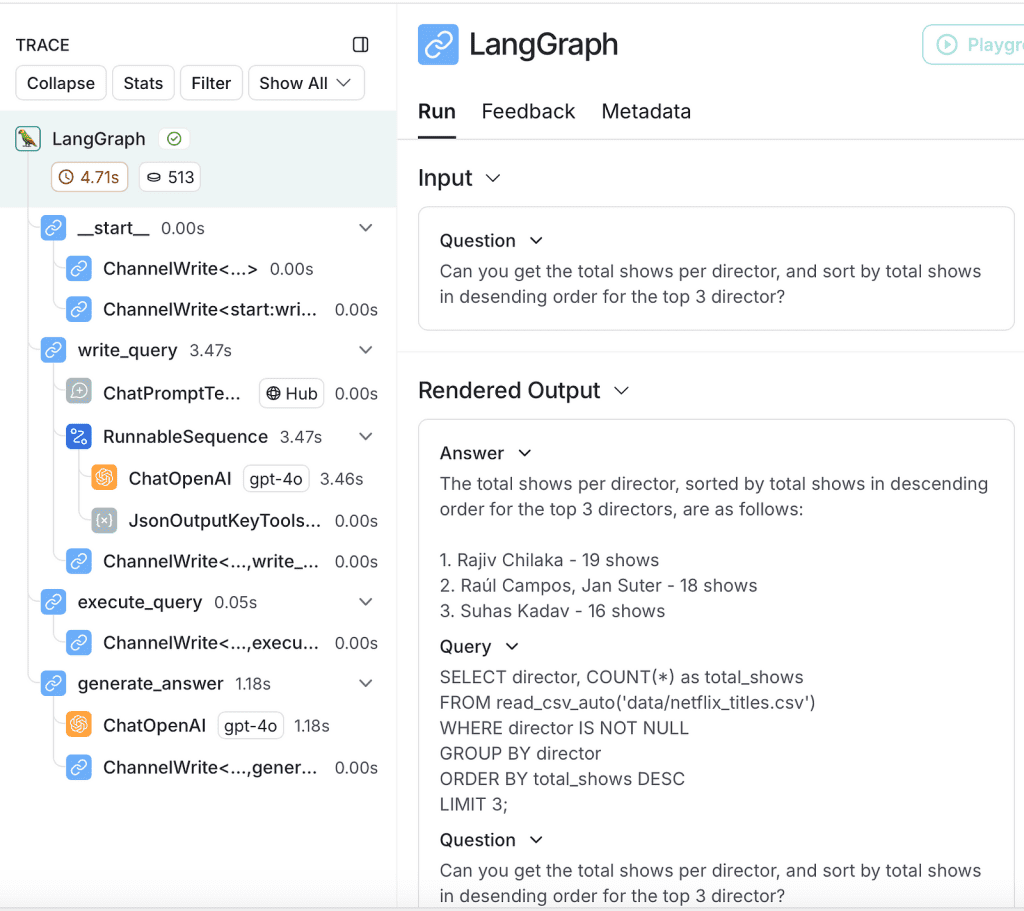
By following all three steps, we will be able to create a reliable AI agent that can assist in addressing business inquiries without the need for a knowledge of SQL syntax. Here is the peak of the output for the three steps mentioned above.
The question I asked is, “Can you get the total shows per director and sort by total shows in desending order for the top 3 directors?”
{'write_query': {'query': "SELECT director, COUNT(*) as total_shows \nFROM read_csv_auto('data/netflix_titles.csv') \nWHERE director IS NOT NULL \nGROUP BY director \nORDER BY total_shows DESC \nLIMIT 3;"}}
{'execute_query': {'result': [Document(metadata={}, page_content='director: Rajiv Chilaka\ntotal_shows: 19'), Document(metadata={}, page_content='director: Raúl Campos, Jan Suter\ntotal_shows: 18'), Document(metadata={}, page_content='director: Suhas Kadav\ntotal_shows: 16')]}}
{'generate_answer': {'answer': 'The total shows per director, sorted by total shows in descending order for the top 3 directors, are as follows:\n\n1. Rajiv Chilaka - 19 shows\n2. Raúl Campos, Jan Suter - 18 shows\n3. Suhas Kadav - 16 shows'}}
The book starts with an overview of AI engineering, explaining how it differs from traditional ML engineering and discussing the new AI stack. The more AI is used, the more opportunities there are for catastrophic failures, and therefore, the more important evaluation becomes. This book discusses different approaches to evaluating open-ended models, including the rapidly growing AI-as-a-judge approach.
AI application developers will discover how to navigate the AI landscape, including models, datasets, evaluation benchmarks, and the seemingly infinite number of use cases and application patterns. You'll learn a framework for developing an AI application, starting with simple techniques and progressing toward more sophisticated methods, and discover how to efficiently deploy these applications.
Step 0. Choose the right LLM for SQL
Initially, we would need to configure all of the environment variables correctly, select gpt-4o as our base LLM model, and then utilize sql-query-system-prompt from the langchain hub to simplify the SQL generation process.
import os
from langchain_openai import ChatOpenAI
from langchain import hub
## Setup Proper Enviroment Variables
os.environ["LANGCHAIN_API_KEY"] = os.environ.get("LANGCHAIN_API_KEY")
os.environ["LANGCHAIN_TRACING_V2"] = os.environ.get("LANGCHAIN_TRACING_V2")
os.environ["OPENAI_API_KEY"] = os.environ.get("OPENAI_API_KEY")
## Set the LLM Model
llm = ChatOpenAI(model="gpt-4o")
## Choose specific prompt to help with the model
query_prompt_template = hub.pull("langchain-ai/sql-query-system-prompt")
sql-query-system-prompt is a prompt template followed by 4 key parameters to fill: dialect, top_k, table_info, and input. Those parameters we will fill out in the next step.
Step 1. Build write_query function
To keep the workflow input & output exchangeable for LangChain, we will create a class called State to help keep the output of each step.
From step 0, we have the sql-query-system-prompt as a prompt template. In order to enhance the precision of the SQL generated, it would be necessary to inform LLM of the specific SQL flavor in which we are interested. Since we will use duckDB, this can be done by providing duckdb as the dialect.
Another key value to provide is the table_info, which can provide more insights to LLMs about the schema or sample row of the table. As we read the table directly from a CSV file, we will leverage the read_csv_auto function in duckDB with the CSV file path. The table_info will serve as the table name and be used as a from clause in the final SQL statement.
Finally, we would return the generated SQL as a query for the next step to execute against duckDB.
from typing_extensions import Annotated
class State():
question: str
query: str
result: str
answer: str
class QueryOutput(TypedDict):
query: Annotated[str, ..., "Syntactically valid SQL query."]
def write_query(state: State):
"""Generate SQL query to fetch information."""
prompt = query_prompt_template.invoke(
{
"dialect": "duckdb",
"top_k": 10,
"table_info": f"read_csv_auto('{file_path}')",
"input": state["question"],
}
)
structured_llm = llm.with_structured_output(QueryOutput)
result = structured_llm.invoke(prompt)
return {"query": result["query"]}
Let’s first test the output to see if the SQL generated is expected.
sql_query = write_query({"question": "Can you get the total shows per director, and sort by total shows in desending order?"})
print(sql_query)
The output is a valid SQL statement that appears to be able to effectively utilize the columns.
{'query': "SELECT director, COUNT(*) as total_shows \nFROM read_csv_auto('data/netflix_titles.csv') \nWHERE director IS NOT NULL\nGROUP BY director \nORDER BY total_shows DESC \nLIMIT 10;"}
Step 2. Build execute_query function
Now that we have the SQL statement, we should be able to test it by running it through duckDB. The duckDB loader offered by LangChain facilitates integration with the document loader interface of LangChain.
The output from the state object can be retrieved and passed to DuckDBloader, which will execute the query generated from LLM and run the DuckDB, as we continue the SQL query from step 1.
This step is prone to errors for a variety of reasons, as we rely entirely on the SQL generated from LLM. In order to prevent data loss or accidental manipulation without notice, we either refrain from conducting any DDL-type questions or incorporate a human review process. In addition, we can implement some permission control on the database side to prevent the accidental execution of specific SQL queries.
from langchain_community.document_loaders import DuckDBLoader
def execute_query(state: State):
"""Execute SQL query."""
data = DuckDBLoader(state["query"]).load()
return {'result': data}
The output of the query that was executed in duckDB is provided below.
{'result': [
Document(metadata={}, page_content='director: Rajiv Chilaka\ntotal_shows: 19'),
Document(metadata={}, page_content='director: Raúl Campos, Jan Suter\ntotal_shows: 18'),
Document(metadata={}, page_content='director: Suhas Kadav\ntotal_shows: 16')
]
}
Step 3. Build generate_answer function
The final step in this process is to utilize the SQL result to generate a paragraph that is more comprehensible to humans. This may not be required if you are capable of directly parsing the SQL result. Nevertheless, it can be a highly beneficial step to utilize LLM to summarize the output.
The generate_answer step is a straightforward process that involves combining all the information and allowing LLM to summarize the outcome.
def generate_answer(state: State):
"""Answer question using retrieved information as context."""
prompt = (
"Given the following user question, corresponding SQL query, "
"and SQL result, answer the user question.\n\n"
f'Question: {state["question"]}\n'
f'SQL Query: {state["query"]}\n'
f'SQL Result: {state["result"]}'
)
response = llm.invoke(prompt)
return {"answer": response.content}
Here is the output of the generate_answer step, and LLM also provides a line break to facilitate comprehension as paragraphs.
{'answer':
'The total shows per director, sorted by total shows in descending order for the top 3 directors, are as follows:\n\n
1. Rajiv Chilaka - 19 shows\n
2. Raúl Campos, Jan Suter - 18 shows\n
3. Suhas Kadav - 16 shows'
}
Combine all the steps
Ultimately, we can utilize LangChain to construct a graph, thereby automating workflow management and state control seamlessly.
from langgraph.graph import START, StateGraph
graph_builder = StateGraph(State).add_sequence(
[write_query, execute_query, generate_answer]
)
graph_builder.add_edge(START, "write_query")
graph = graph_builder.compile()
Monitor a request using LangChain Smith
To obtain deeper insights into the overall request lifecycle, we can utilize LangChain Smith for more detailed information. The tool effectively provides users with visibility into requests made to our AI agent, preventing us from regarding the LLM as a mere black box.
Here is the LangGraph that LangChain Smith has provided. We can obtain insights regarding each step in the graph, as well as the latency, inputs, and outputs associated with each step.
Addtional Examples
Let us pose additional inquiries utilizing our AI agent regarding the Netflix dataset to ascertain whether it can generate the accurate SQL and provide the correct answer.
Q1: Can you get the number of shows that start with letter D?
The query accurately identifies the appropriate column title and correctly counts the number of shows.
for step in graph.stream(
{"question": "Can you get the number of shows that start with letter D??"}, stream_mode="updates"
):
print(step)
""" Output is
{'write_query': {'query': "SELECT COUNT(*) FROM read_csv_auto('data/netflix_titles.csv') WHERE title LIKE 'D%';"}}
{'execute_query': {'result': [Document(metadata={}, page_content='count_star(): 375')]}}
{'generate_answer': {'answer': 'There are 375 shows that start with the letter D.'}}
"""
Q2: Can you get the how many years between each show director Rajiv Chilaka produced, sort by release years?
This aspect astonishes me. As we formulate increasingly intricate SQL utilizing the window function, the LLM comprehends the inquiry effectively.
for step in graph.stream(
{"question": "Can you get the how many years between each show director Rajiv Chilaka produced, sort by release years?"}, stream_mode="updates"
):
print(step)
""" Output is
{'write_query': {'query': "SELECT title, release_year, release_year - LAG(release_year) OVER (ORDER BY release_year) AS years_between_releases\nFROM read_csv_auto('data/netflix_titles.csv')\nWHERE director = 'Rajiv Chilaka'\nORDER BY release_year\nLIMIT 10;"}}
{'execute_query': {'result': [Document(metadata={}, page_content='title: Chhota Bheem & Ganesh\nrelease_year: 2009\nyears_between_releases: None'), Document(metadata={}, page_content='title: Chhota Bheem aur Krishna\nrelease_year: 2009\nyears_between_releases: 0'), Document(metadata={}, page_content='title: Chhota Bheem & Krishna: Pataliputra- City of the Dead\nrelease_year: 2010\nyears_between_releases: 1'), Document(metadata={}, page_content='title: Chhota Bheem: Bheem vs Aliens\nrelease_year: 2010\nyears_between_releases: 0'), Document(metadata={}, page_content='title: Chhota Bheem & Krishna: Mayanagari\nrelease_year: 2011\nyears_between_releases: 1'), Document(metadata={}, page_content='title: Chhota Bheem: Journey to Petra\nrelease_year: 2011\nyears_between_releases: 0'), Document(metadata={}, page_content='title: Chhota Bheem: Master of Shaolin\nrelease_year: 2011\nyears_between_releases: 0'), Document(metadata={}, page_content='title: Chhota Bheem Aur Hanuman\nrelease_year: 2012\nyears_between_releases: 1'), Document(metadata={}, page_content='title: Chhota Bheem: Dholakpur to Kathmandu\nrelease_year: 2012\nyears_between_releases: 0'), Document(metadata={}, page_content='title: Chhota Bheem: The Rise of Kirmada\nrelease_year: 2012\nyears_between_releases: 0')]}}
{'generate_answer': {'answer': 'Based on the SQL result, here are the number of years between each show that director Rajiv Chilaka produced, sorted by release years:\n\n1. "Chhota Bheem & Ganesh" - Released in 2009 (No previous release to compare, so the difference is None)\n2. "Chhota Bheem aur Krishna" - Released in 2009 (0 years since the previous release)\n3. "Chhota Bheem & Krishna: Pataliputra- City of the Dead" - Released in 2010 (1 year since the previous release)\n4. "Chhota Bheem: Bheem vs Aliens" - Released in 2010 (0 years since the previous release)\n5. "Chhota Bheem & Krishna: Mayanagari" - Released in 2011 (1 year since the previous release)\n6. "Chhota Bheem: Journey to Petra" - Released in 2011 (0 years since the previous release)\n7. "Chhota Bheem: Master of Shaolin" - Released in 2011 (0 years since the previous release)\n8. "Chhota Bheem Aur Hanuman" - Released in 2012 (1 year since the previous release)\n9. "Chhota Bheem: Dholakpur to Kathmandu" - Released in 2012 (0 years since the previous release)\n10. "Chhota Bheem: The Rise of Kirmada" - Released in 2012 (0 years since the previous release)'}}
"""
Learn how to empower AI to work for you. This book explains:
- The structure of the interaction chain of your program's AI model and the fine-grained steps in between
- How AI model requests arise from transforming the application problem into a document completion problem in the model training domain
- The influence of LLM and diffusion model architecture—and how to best interact with it
- How these principles apply in practice in the domains of natural language processing, text and image generation, and code
Final Thought
Utilizing the aforementioned example, we can formulate intricate inquiries to elicit responses from the LLM and retrieve requests from the duckDB database efficiently. A background in SQL is no longer requisite for conducting data analysis due to the advancements in LLM technology. This may raise further inquiries regarding the role of Data Analysts: will LLMs produce SQL that could enhance their capabilities or jeopardize their positions?
In this article, we have observed the ability of AI agents to complete specific tasks without any problem. Although there are still areas that require human interaction for AI agents, the proportion of time that humans are required has decreased significantly. I anticipate that in 2025, there will be an increase in the construction of AI agents to address specific domain-related issues.
To access the full code for building an AI agent to generate SQL, here is the notebook to show you all the code: https://github.com/ChengzhiZhao/AIAgentExamples/tree/main/SQLGenerationAgent
What are your thoughts? Please leave your comments below.
Recommended Books
Build a Large Language Model (from Scratch) takes you inside the AI black box to tinker with the internal systems that power generative AI. As you work through each key stage of LLM creation, you’ll develop an in-depth understanding of how LLMs work, their limitations, and their customization methods. Your LLM can be developed on an ordinary laptop, and used as your own personal assistant.
Large language models (LLMs) and diffusion models such as ChatGPT and Stable Diffusion have unprecedented potential. Because they have been trained on all the public text and images on the internet, they can make useful contributions to a wide variety of tasks. And with the barrier to entry greatly reduced today, practically any developer can harness LLMs and diffusion models to tackle problems previously unsuitable for automation.
About Me
I hope my stories are helpful to you.
For data engineering post, you can also subscribe to my new articles or becomes a referred Medium member that also gets full access to stories on Medium.